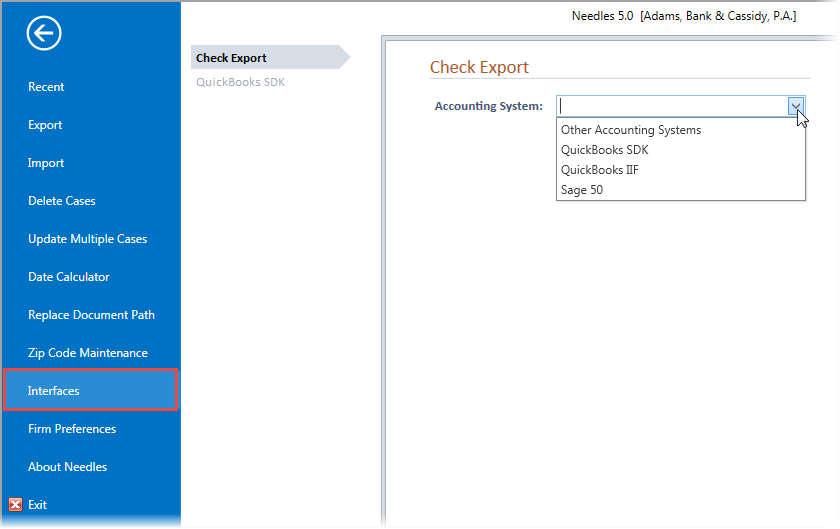
If you use an accounting program to manage your account and create checks, you can set up Needles to interface with your system, integrating the case and value information that you enter for the case.
The Credit and Debit Account mini directories should be customized before configuring the Accounting System Interface. When using the QuickBooks SDK Interface, the Credit and Debit mini directories are no longer necessary as the bidirectional interface links directly to the QuickBooks chart of accounts for the selected company file. The sections listed below provide the specific instructions for setting up each type of system interface. Once the interface setup has been completed, options for requesting and exporting checks will be available. When using the QuickBooks SDK Interface, additional features will also be available depending on the setup options selected.
After selecting an accounting interface with appropriate options on the Check Export tab, features for Requesting and Processing Checks and Exporting Checks from Needles into your accounting system will be available. The QuickBooks SDK interface will require additional configuration in order to enable the bidirectional flow of information between QuickBooks and Needles including exporting check requests, Requesting and Processing Deposits and Exporting Deposits, updating of Vendor and Customer names and addresses, and sending time entries to QuickBooks.
You will need permissions to the Interfaces tabs in order to configure your system to work with any of the available accounting interfaces.
To access the Accounting System Interfaces options to select your accounting system, click on the File menu and select Interfaces > Check Export tab. The available accounting system options are listed below.