Selecting Calendar Preferences in Needles
You will first need to select the appropriate global settings that will
tell Needles which program you will be using for your Calendar.
Remember, global settings affect all users. Options for synchronization
of appointments are set directly in the Outlook tab of a user’s Staff
Directory settings, described in Activating Appointment Sync
Settings.
From the File menu tab,
- Select Firm
Preferences.
- Select the Calendar/Email
tab.
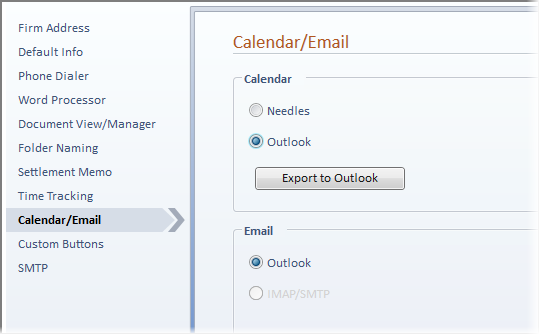
Needles Calendar
Selecting Needles as the
default Calendar will allow appointments to be synced between the Needles
calendar and the Outlook calendar on an individual user basis if desired.
Click Save to apply your
changes.
Outlook Calendar
Selecting Outlook as the
default Calendar will use only
the Outlook calendar. Click Save
to apply your changes.
Selecting the Outlook Calendar option means that all
Needles users must use the Outlook calendar. There will be no access to
the Needles calendar. We do not recommend selecting the Outlook Calendar
integration unless the users are familiar with working in the Outlook
calendar and have the ability to add/view appointments for other users.
- The Calendar button on the Home ribbon will
be replaced with an Outlook
Calendar button, which will display your Outlook Calendar when
clicked.
- Outlook appointments will display in the Needles
Today tab window.
- You will be able to link an Outlook appointment
to a Needles case, allowing a user to quickly jump from the item in
Outlook to the case in Needles. Refer to Activating Outlook Sync Settings
for further instructions.
- There will be no access to the Needles calendar,
and therefore, no syncing of information will occur with the Needles
calendar.
- Needles Calendar Reports will no longer show
current information as items can no longer be entered on the Needles
Calendar. You will need to utilize Outlook reporting capabilities
for your calendar reporting needs.
- If you wish to copy existing Needles calendar
items into each user’s Outlook calendar, refer to Exporting Appointments to Outlook.