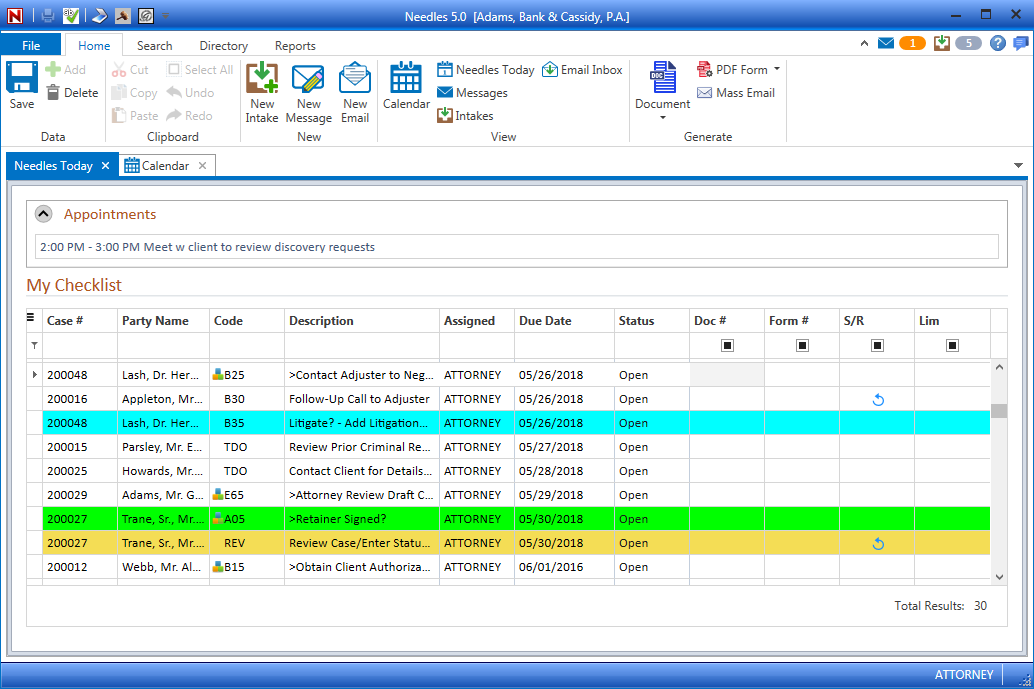
The Needles Today window displays a summary of calendar appointments and checklist items in one convenient location. Individual Staff preferences selected on the Needles Today Tab in the Staff Directory will dictate how and when the Needles Today window is displayed.
The Appointments portion of the window displays scheduled appointments on your calendar for the current day. Double-clicking on a listed appointment will display the detail of the actual calendar item. Double-clicking on the Appointments heading will open the Calendar to the default view.
The My Checklist section shows all of your assigned checklist items that have come due for all cases. Double-clicking on the Case Number will open that case to the Case Tab. Double-clicking on the Party Name will open the case to the Party Tab. The My Checklist grid behaves just as the Checklist Tab in a case. Click the calendar icon in the Due Date and a monthly calendar popup will display to easily select a new due date. Click on the Status field to update the status from the dropdown options. Select the check box in the Document or Form column to merge linked documents for those checklist items.