
The Header Bar is located at the top of the User Defined Setup Screen Layout Designer. It displays the title, list of field types and, depending on the type of user defined screen accessed, the corresponding Role, Type or Code dropdown. The standard header bar contains the title of the tab and the Field Types dropdown.
This view is standard for Case Tab, Counsel Tab, User Tab List/Entry Tabs 1-10, CRM Tab and the Document Layout screen. Variations of the header bar are described more fully below:
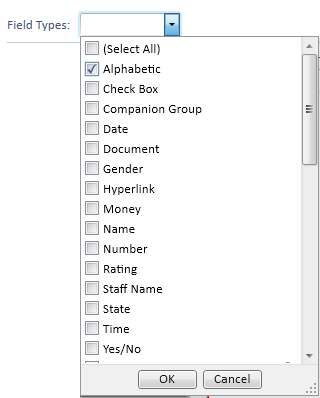
One or more field types may be selected from the Field Types dropdown on the header bar by clicking the corresponding check box. The Field Types dropdown allows the available fields in the Items Pane to be filtered based on the selected field type(s).
In addition to the Field Types dropdown, user defined portions of the Provider, Party, Insurance and Value Tabs can be further defined by Party Role, Provider Role, Insurance Type and Value Code.
A different user defined party screen can be designed for each party role in the selected case type. The Party Role dropdown on the Header Bar of a Party User Defined Setup Tab displays a list of active party roles from the Party Role Mini Directory. A party role must be selected in order to design the user defined section of a Party Tab.

A different user defined provider screen can be designed for each provider role. The Provider Role dropdown displays a list of active provider roles from the Provider Role Mini Directory. A provider role must be selected in order to design the user defined section of a Provider Tab.

A different user defined insurance screen can be designed for each insurance type in the selected case type. The Insurance Type dropdown displays a list of active insurance types from Insurance Type Mini Directory. An insurance type must be selected in order to design the user defined section of an Insurance Tab.

A different user defined value screen can be designed for each value code in the selected case type. The Value Code dropdown displays a list of active value codes from the Value Code Mini Directory. A value code must be selected in order to design the user defined section of a Value Tab.
