 when a field is in edit mode. When a field is in view mode, an arrow icon
 will be displayed.
Once providers have been added to a Provider Associations Group, you may find that the Group Name will need to be renamed to better represent its members. A Provider Associations Group Name can only be changed within the Provider Associations Directory.
The Hide/Show List button on the Header Band can be used to toggle the visibility of the Groups Pane.
To rename a Provider Associations Group,
The row indicator
will display an edit icon
when a field is in edit mode. When a field is in view mode, an arrow icon
will be displayed.
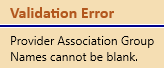
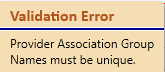
A Group Name cannot be blank or duplicated. You will notice a red validation border and icon with one of the corresponding validation messages.
The renamed Provider Association Group Name will be displayed in all areas of Needles that use the Group Name. If the Provider Associations tab of a provider member is currently open while a group name change is made, the following change notification will be displayed in the header bar of the tab. The Staff Name that has made the change will be displayed as applicable. Click on the change notification message to refresh the data on the screen with the corresponding changes made in the Directory.
